Showing posts with label Being secure. Show all posts

Saturday, March 26, 2016

A Conversation on Privacy

A Conversation on Privacy

A Conversation on Privacy


이 문서는 eEsc m⌥⌘Meta aAlt c^Ctrl sShift org-mode로 작성된 글입니다.


Noam Chomsky, Edward Snowden (@Snowden), 그리고 The Intercept (@the_intercept)의 에디터인 Glenn Greenwald (@ggreenwald)가 참가한 A Conversation on Privacy 이름의 공개 담화(?)이다. 주제는 "시민에 대한 국가 안보와 정부의 개입 사이의 균형 (The balance between national security and government intrusion on the rights of private citizens) "인데, 디지털 시대의 시민의 프라이버시와 자유에 관한 총체적이고 핵심적인 사항에 관하여 전반적으로 다룬다. 무척 볼만하다.


Creative Commons License
This work is licensed under a Creative Commons Attribution-NonCommercial-ShareAlike 4.0 International License.

Created: 2016-03-26 Sat 03:38

Emacs 24.3.1 (Org mode 8.2.10)

Friday, February 19, 2016

Tim's bravery

Apple과 Tim Cook

Apple과 Tim Cook


이 문서는 eEsc m⌥⌘Meta aAlt c^Ctrl sShift org-mode로 작성된 글입니다.


2016년 2월 16일, Tim Cook이 FBI의 요구는 iOS에 backdoor를 만들라는 말과 다름 아니라며 Apple은 US 정부의 요구에 응하지 않겠다는 요지의 글 "A Message to Our Customers"을 Apple Homepage에 올렸다.

여기에 내가 구독하는 RSS에 등록되어 있는 다양한 매체에서 일제히 이에 관한 글들이 발행된다.

Edward Snowden(@Snowden)도 트윗에서 몇 마디 거들며 Google의 Sundar Pichai (순다 피차이)를 비난(?)하고 Sundar Pichai는 이에 답한다. (개인적으로, 그 대답은 식상하기 그지없고 내 기대와는 많이 다르지만 예상과는 크게 다르지 않다.)

자세한 내용은 위의 링크된 사이트들을 방문하면 알 수 있고, 원문 ("A Message to Our Customers, Tim Cook")도 한번 쯤 읽어보기를 추천한다. 여기서는 개인적인 짧은 감상평(?)을 적으려 한다.

우선 "Funtenna 기사"에서 "미국의 연방 법원이 명령했다"라는 표현은 조금 설명이 필요한 것으로 보인다. The Washington Post의 기사를 보면 "by a magistrate judge in Riverside, Calif."라는 표현이 나오는데, 한글로 옮기자면 "캘리포니아 주 Riverside 시의 치안 판사(magistrate judge)"의 명령이다. 미국 사법 체계를 정확히 안다고 할 수 없지만, 행정부 (FBI)가 일종의 영장(warrant/writ/order)이 필요해서 법원에 요청, 치안 판사(magistrate judge)가 이를 받아들여 명령(order)한 것으로 보인다. Tim Cook의 "A Message to Our Customers"에서도 FBI와 행정부는 입법부/국회(Congress)를 거치는 정당한 절차를 밟지 않고 1789년(맞다 1789년이다)의 "All Writs Act of 1789"를 남용하고 있다고 지적한다.

또 하나 재미(?)있는 점이 있다. 구체적으로 FBI가 요구가 iPhone 5c에서 " 잠금해제를 10 번 실패하면 저장된 정보를 초기화 시키는 보안 설계 "를 우회하게 만들어 달라는 것이다. 그렇게 해주면, 아마도 천만 번 혹은 수억 번 쯤 경우의 수를 돌려 풀겠지. 재미있지 않은가?! FBI도 못 푼다는 말이다! 게다가 데이터를 날리는 기능이 얼마나 강력하면 Degaussing을 하는 것도 아닌데 10번 해서 날아간 데이터는 못 살린다는 의미까지 포함된다. 그동안 보안을 생각하면 Jailbreak 하지 말고 iPhone을 사용하라고 주위에 얘기했었는데, 다시 한번 입증되는 순간이다.

Apple과 Tim Cook이 이 문제를 어떻게 풀어갈 것인가 흥미롭게 두고 볼 것이지만, 우선은 Tim Cook의 용기있는 결정에 박수를 보낸다.


Creative Commons License
This work is licensed under a Creative Commons Attribution-NonCommercial-ShareAlike 4.0 International License.

Created: 2016-02-19 Fri 10:03

Emacs 24.3.1 (Org mode 8.2.10)

Friday, August 21, 2015

Incognito

Chrome Incognito by default

Chrome Incognito by default


이 문서는 e[ ⎋Esc ]m[ ⌥Meta ]a[ ⌥Alt ]c[ ^Ctrl ]s[ ⇧Shift ] org-mode로 작성된 글입니다.


System Environments

Operating Systems

  • Main- : OS X Yosemite (10.10.5)
  • Sub- : Debian GNU/Linux Wheezy (7.8)
  • Server: Debian GNU/Linux Wheezy || Squeeze
  • Mobile: iOS 7.1.2


Google Chrome의 Incognito mode는 Privacy Mode의 다른 말로써, 이용 내역을 저장하지 않고 브라우저를 사용하는 기능이다. 방문한 페이지의 내역(history), http 정보(cookie), 프록시 서버 저장된 정보(web cache) 등이 저장되지 않아서 개인 정보 노출에 민감한 경우에도 유용하게 쓸 수 있다.

in‧cog‧ni‧to |inkɑ́ɡnitòu┃-kɔ́ɡ-|

[형용사][부사] 《라틴어》 익명의[으로], 가명의[으로]; 암행의[으로]

> an incognito traveler 신분을 숨긴 여행자.

[명사] (『복수』 incognitos |-z| )

1.익명자; 미행자. 2.[불]미행. 3.익명, 가명.

from OSX 내장 뉴에이스 영한사전

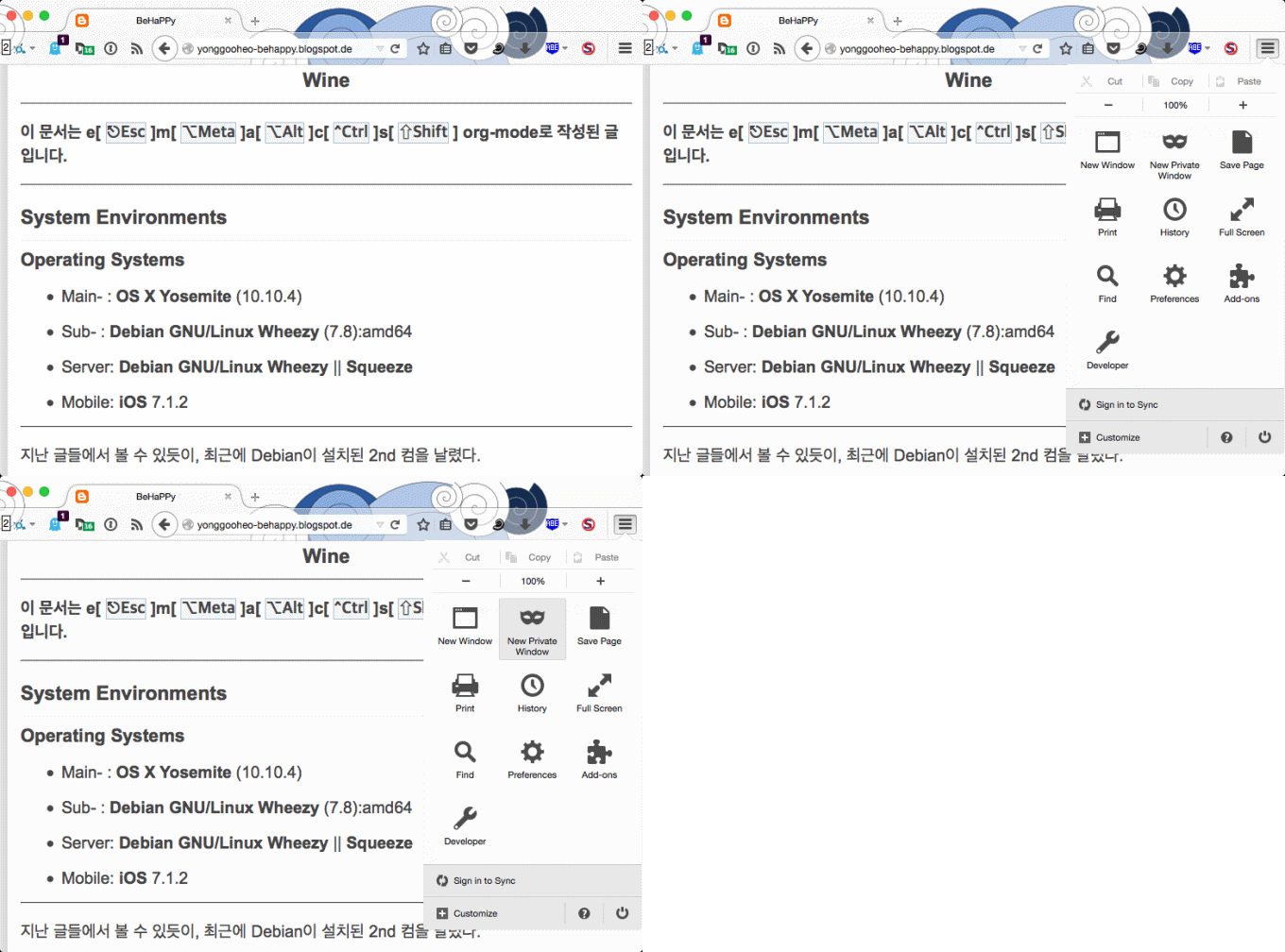
Private Mode를 쓰는 방법은 간단하다. Chrome(or Chromium)에서는 주소창 맨 오른쪽에 위치한 20549413899_b021ba717f_o.png를 클릭한 후, New Incognito Window 에서 사용할 수 있고, Firefox(or Iceweasel)에서도 역시 주소창 맨 오른쪽의 20549413899_b021ba717f_o.png를 클릭, New Private Window 에서 할 수 있다.

20710485986_6d901c96bb_o.gif

Figure 1: Mozilla Firefox Private Mode in OSX

최근에 보안상의 이유로 메인컴인 OSX Yosemite에서 Adobe Flash를 완전히 삭제하면서, 부득이하게 가끔 Flash가 필요할 때가 생겼다. 때문에, Flash가 브라우저에 내장된 Google Chrome을 설치해서 종종 쓰는데, 여기에서는 어떤 extensions도 설치하지 않고 순정으로 쓰고 있다. 그래서 쓸 때마다 Incognito Mode를 활성화하는 데, 너무 귀찮아서 "항상 incognito로 켤 순 없을까?"하는 고민을 하게 되었다. 이 포스팅에서는 Chrome을 열 때 항상 Incognito Mode를 활성화 하는 방법을 기술하려 한다. 기술적으로는 Bash(Terminal.app in OSX, Terminal emulator, etc in Linux)에서 --args --incognito 옵션으로 Chrome을 실행하는 것과 다름없는데, 이를 OS 마다 적당히 적용해서 사용을 더 간단하게 하는 것이 목적이다.

Open Google Chrome always with Incognito mode

테스트에 사용한 Google Chrome 버전과 OS는 아래와 같다.1

  • 44.x (64-bit) in OSX Yosemite
  • 44.x (64-bit) in Debian GNU/Linux Wheezy with XFCE

Google Chrome은 이미 설치했다고 가정한다.

OSX Yosemite

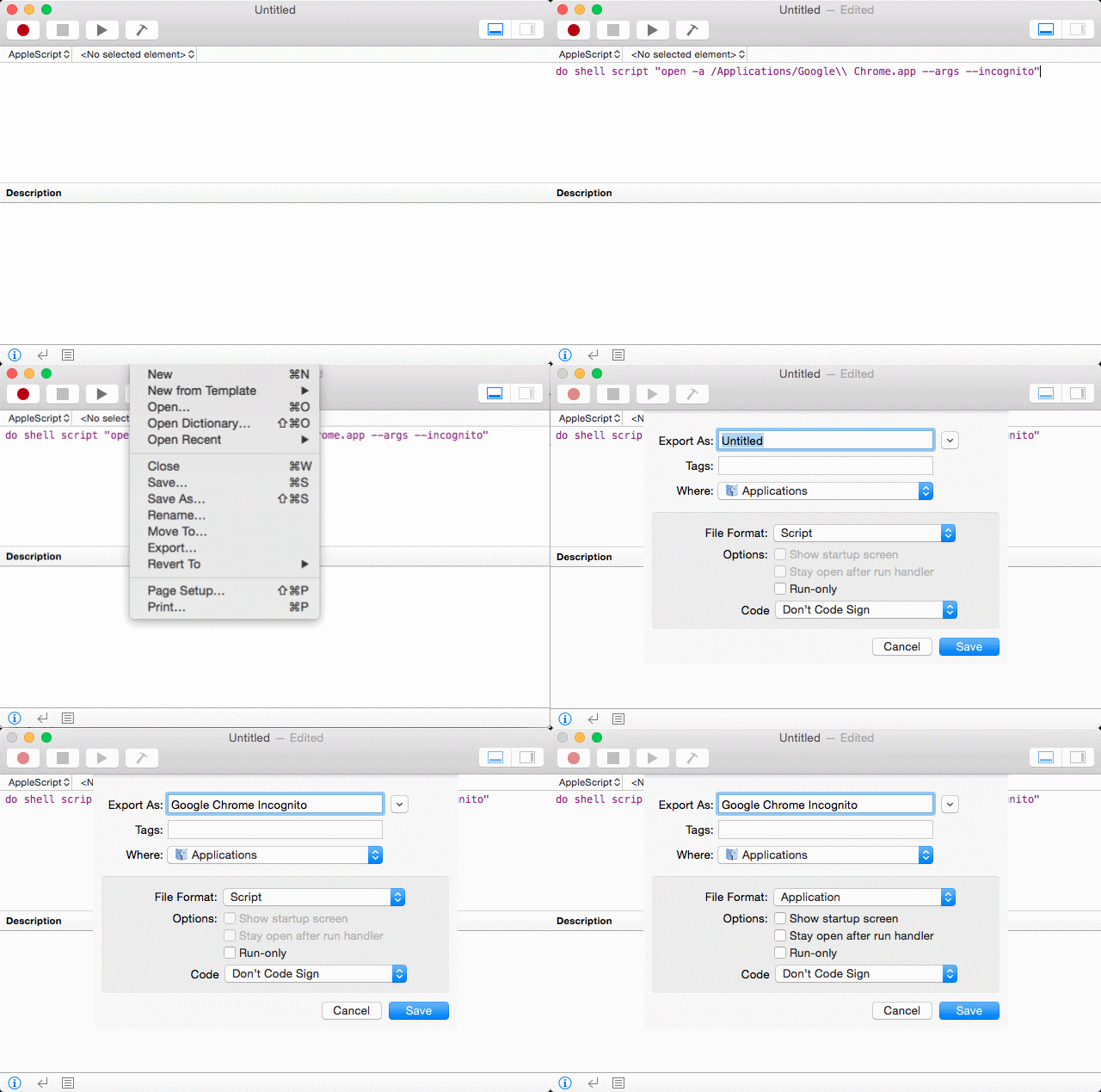
여기서 사용한 방법을 간단히 기술하면, Bash(Terminal.app)에서 open -a /Applications/Google\\ Chrome.app --args --incognito 를 실행하는 Apple Script를 만들어 Application으로 등록하는 것이다.

Instruction

  1. /Applications/Utilities 아래에 있는 Script Editor.app 을 연다.
  2. 아래를 적어 넣는다.
    do shell script "open -a /Applications/Google\\ Chrome.app --args --incognito"
    
  3. 메뉴에서 Export 를 클릭해서, [Export As:]에서 적당한 이름을 적고, [Where:]에서 /Applications 을 선택한 후, [File Format:]을 Application 으로 해서 저장한다.

이제, /Applications 아래에 새롭게 만든 Application이 등록된 것을 확인할 수 있다. 원한다면 Get Info (단축키 ⌘i)에서 아이콘도 바꿀 수 있다. 이제 원래 있는 Google Chrome이 아니라, 본인이 직접 이름 지은 새 Application을 쓰면 된다.

20744281801_54d04f59e6_o.gif

Figure 2: Workflow of Script Editor for making the application

Debian GNU/Linux

Google Chrome을 설치했다면 Bash(Terminal Emulator or etc)에서 google-chrome --args --incognito 명령을 실행하는 것으로 바로 Incognito Mode로 Chrome을 열 수 있다. 여기서는 /opt/google/chrome 아래에 있는 Shell Script인 google-chrome 을 수정하려 한다. 당연히, 사용자는 root 권한이 있어서 sudo 명령어를 쓸 수 있어야 한다.

Instruction

  1. Bash(Terminal Emulator or etc)를 열어 /opt/google/chrome/ 로 이동한다.
    $ cd /opt/google/chrome
    
  2. sudo 와 함께 적당한 에디터로 google-chrome 을 연다. 아래는 mousepad 로 실행한 예이다.
    $ sudo mousepad google-chrome
    
  3. 아래와 같이 적힌 부분을 찾자. 다른 부분은 건드리지 않게 주의한다!
    # Make sure that the profile directory specified in the environment, if any,
    # overrides the default.
    if [[ -n "$CHROME_USER_DATA_DIR" ]]; then
      # Note: exec -a below is a bashism.
      exec -a "$0" "$HERE/chrome"  \
        --user-data-dir="$CHROME_USER_DATA_DIR" "$@"
    else
      exec -a "$0" "$HERE/chrome"  "$@"
    fi
    
  4. 여기서 중요한 부분은 두 군데 있는 exec -a "$0" "$HERE/chrome" 이다. 아래와 같이, 두 곳 모두 exec -a "$0" "$HERE/chrome" --args --incognito 로 고친 후 저장하자.
    # Make sure that the profile directory specified in the environment, if any,
    # overrides the default.
    if [[ -n "$CHROME_USER_DATA_DIR" ]]; then
      # Note: exec -a below is a bashism.
      exec -a "$0" "$HERE/chrome" --args --incognito  \
        --user-data-dir="$CHROME_USER_DATA_DIR" "$@"
    else
      exec -a "$0" "$HERE/chrome" --args --incognito  "$@"
    fi
    

이제, Bash에서 google-chrome 명령어로 직접 열든, 어딘가 이미 등록되어 있는(보통 Applications Menu 아래) Google Chrome을 클릭하던, 항상 --args --incognito 옵션으로 실행되어 Incognito Mode로 열릴 것이다.


Created: 2015-08-21 Fri 22:53

Emacs 24.3.1 (Org mode 8.2.10)

Wednesday, June 4, 2014

You have a new Goole Doc message

You have a new Goole Doc message

You have a new Goole Doc message


;; =================================================
;; εμαcs is ⎋[esc]⌘[meta]⌥[alt]⌃[ctrl]⇧[shift].
;; =================================================

This post is written with emacs org-mode.


If you have ever got an email like the following

Just Uploaded Some File For You Using Google Docs.

Kindly Click On Here To Upload The Files I Uploaded For You.

Don't click the link Click On Here !!!

It requires one of your passwords for Google, Yahoo, etc. to see the file. Don't do it. It is a phishing.

The subject of such an email is supposed to be

You have a new Goole Doc message

It is not sent directly to you, but as Bcc.

FYI) How to know if my gmail is hacked or not?

See the instruction, Here’s how to know if your Gmail has been hacked

You think you got hacked already?

  • Change your important passwords immediately!
  • Export all your emails from servers!
  • Clean entire your mailboxes up!

Creative Commons License
This work is licensed under a Creative Commons Attribution-NonCommercial-ShareAlike 4.0 International License.

Created: 2014-06-04 Wed 00:47

Emacs 23.4.1 (Org mode 8.0.2)