OSX Yosemite
;; =================================================
;; εμαcs is ⎋[esc]⌘[meta]⌥[alt]⌃[ctrl]⇧[shift].
;; =================================================
This post is written with emacs org-mode.
이 문서는 emacs org-mode로 작성된 글입니다.
System Environments
Operating Systems
- Main- : OS X Yosemite (10.10.3)
- Sub- : Debian GNU/Linux Wheezy (7.8)
- Server: Debian GNU/Linux Wheezy || Squeeze
- Mobile: iOS 7.1.2
Hardware Systems
- OSX installed : MacBook Pro(13-inch, Mid 2009) 2.53 GHz Intel Core 2 Duo
- Debian installed : Zotac ZBOX ID12 Intel Atom D525
Yosemite
7-month-late upgrading to Yosemite has done after its release. It's not a good time to say something generally useful. I wanna make a few comments for particular things that are quite valuable to me, not to everyone.
Brief lists
My indispensable applications, such as Quicksilver, Aquamacs(2.5x), baram(Input Method), MATHEMATICA(8) are smoothly working and so is MacPorts for installation of LaTeX, gcc, etc. It would be a good start.
OK w/o any upgrade
- Aquamacs 2.5x, Photoscape X 1.8, Skype 6.17x, TeamViewer 9, Acrobat 9, MATHEMATICA 8
- baram (1.5.2), Quicksilver(1.2.2), Veusz(1.23), EzPlusforMac, AppCleaner, EasyFind, HandBrake, Max, MPlayer X, VLC, KeyCastr, Screeny, Sublime Text 2, BugsMusicDownloadManager, VirtualBox, ATOM, TextMate(2.0-β.7.1)
- StartupSound diabled, source codes in Quicklook(
⌘yorSpacebar)
Applications on top are of older versions, because of my personal purpose. There is no difficulty for using them in OSX Yosemite at all.1
The disabled OSX StartupSound is being as it was done in Mavericks. Color syntax for source codes in Quicklook(⌘y or Spacebar) of Finder or Quicksilver turns off at first. But it can be easily turned on by opening TextMate(2.0-β.7.1) once as it was done in Mavericks or earlier.
OK, but ugprade available or required
- 1Password(5.3), DEVONThink(2.8.5), Skim(1.4.11), BibDesk(1.6.4), CyberDuck(4.7), Prizmo(3.1.2),
- GPG, Trim Enabler
- MacPorts: gcc
You could see an warning message like GPG mail is not compatible to Yosemite. It's gonna located in /incompatible applications. Solution is simple. After upgrading is done, you can download the GPG Suite for For OS X 10.10 Yosemite from the homepage and feely delete the older version. I did't turn off the trim before upgrading from Mavericks to Yosemite by means of Trim Enabler, but had no error fortunately. Trim turns off automatically and I could do it manually on via Trim Enabler in Yosemite.
LaTeX and gcc48 were installed in Mavericks via MacPorts. LaTeX sources turn out to be directly compilable by commands, pdflatex, xelatex, etc. But gcc does not. During compiling you could see an error message like gcc: warning: couldn't understand kern.osversion '14.3.0, even though MacPorts is upgraded and sudo port selfupdate is done in Terminal. It can be also easily resolved by installation of gcc49 via MacPorts. FYI) you may need to install gcc_select as well in order to link gcc to gcc-mp-4.9.
Newly installed
- Java 1.6.0.jdk
Things annoying
- Default Font is disgusting. It has been well-known, but worse than my expectation. It literally disgusts me.
tab[↹]key is not working in a dialog box for MATHEMATICA. It is supposed to be once All controls is selected under [System Preferences]->[Keyboard]->[Shortcuts] as the other else. MATHEMATICA is the only application that doesn't work. For the time being, the only option to use a keyboard stroke is use of shortcuts:⌘dfor "Don't save",⌘rfor "Replace",⎋for "Cancel", etc.- Korean-spelling check is systemwidely dysfunctional. It is not an useful information for english-speaking people.
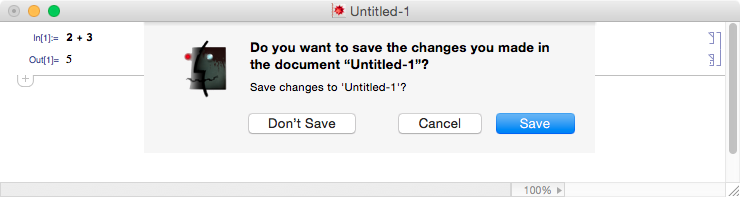
A dialog box in MATHEMATICA
요세미티(Yosemite)
무려 7개월이나 지나서 Yosemite 업그레이드를 했다. 너무 늦어서 유용한 정보를 포스팅하기는 어려울 것 같고, 많은 사람들이 쓰지는 않지만 나는 유용하게 쓰는 것들을 위주로 간단한 느낌을 적어보려한다.
간단한 리스트
나에게 없어서는 안될 Quicksilver, Aquamacs(2.5x), 바람입력기, MATHEMATICA(8), 등이 문제없이 작동하고, gcc, LaTeX, 등을 위한 MacPorts 동작도 무난하다. 우선 이것으로 한시름 놓을 수 있겠다.
바로 잘 동작하는 것들
- Aquamacs 2.5x, Photoscape X 1.8, Skype 6.17x, TeamViewer 9, Acrobat 9, MATHEMATICA 8
- 바람입력기(1.5.2), Quicksilver(1.2.2), Veusz(1.23), EzPlusforMac, AppCleaner, EasyFind, HandBrake, Max, MPlayer X, VLC, KeyCastr, Screeny, Sublime Text 2, BugsMusicDownloadManager, VirtualBox, ATOM, TextMate(2.0-β.7.1)
- StartupSound diabled, source codes in Quicklook(
⌘yorSpacebar)
맨위의 목록은 이유가 있어서 옛버전을 쓰는 것인데, Yosemite에서 잘 동작했다.2
OSX 시작음(StartupSound)은 Mavericks에서 했던데로 계속 무음으로 된다. Finder나 Quicksilver에서 Quicklook(⌘y or Spacebar)로 source codes를 볼 때 color syntax는 풀려서 안되다가, Mavericks에서 했던데로 TextMate(2.0-β.7.1)를 한 번 열면 잘 먹는다.
업그레이드를 요구하거나 가능한 것들
- 1Password(5.3), DEVONThink(2.8.5), Skim(1.4.11), BibDesk(1.6.4), CyberDuck(4.7), Prizmo(3.1.2),
- GPG, Trim Enabler
- MacPorts: gcc
GPG mail은 Yosermite 설치 도중에 호환되지 않는다는 경고가 뜨고 /incompatible applications 아래에 남음. 따로 홈페이지에서 업그레이드 가능하고, 전버전은 지워버리면 된다. Mavericks에서 Trim Enabler로 Trim을 끄지 않고 Yosemite로 업그레이드했으나, 문제는 일으키지 않았다. Trim은 저절로 꺼졌으며, Trim Enabler로 Yosemite에서 다시 켤 수 있었다.
Mavericks에서 LaTeX과 gcc48을 MacPorts로 설치해서 쓰고 있었는데, Yosemite로 업그레이드 후에도 LaTeX(pdflatex, xelatex, etc)은 바로 쓸 수 있었다. LaTeX은 되면 손대지 않는 것이 상책이니 당분간(?) 그냥 쓸 것이다. 문제는 gcc인데, 컴파일시 에러를 토해냈다. MacPorts 업그레이드와 sudo port selfupdate 후에도 문제는 고쳐지지 않았으나, gcc49 설치로 깔끔하게 해결됐다. gcc_select 는 Mavericks에서 설치했었는데, 따로 설치하지 않아도 Yosemite에서 gcc가 gcc49 알아서 잘 찾더라.
새로 설치한 것(Newly installed)
- Java 1.6.0.jdk
몇가지 구리구리한 것들
- 폰트 가독성이 토나온다. 얘기는 익히 들었으나 이 정도일 줄은 몰랐다. 말그대로 어지러워 토나온다.
- MATHEMATICA 대화 상자에서
tab[↹]키가 먹지 않는다. 물론, [System Preferences]->[Keyboard]->[Shortcuts]에서 All controls 선택은 이미 설정했다. 다른 프로그램에서는 잘 동작하는데, 유독 MATHEMATICA만 그렇다. 현재로서는 키보드 단축키가 유일한 해결책으로 보인다. 이를테면,⌘dfor "Don't save",⌘rfor "Replace",⎋for "Cancel", etc. - Aquamacs에서 한글 맞춤법검사가 이상 동작한다. 이건 비단 Aquamacs만의 문제 아니다. 다른 편집기에서도 같은 증상을 보이는 것으로 보아, 지금 쓰고 있는 hunspell 문제로 보이는데… 대안이 있나 모르겠다.
A dialog box in MATHEMATICA

Korean in Aquamacs
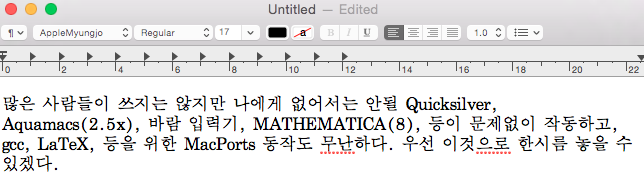
Korean in TextEdit
Epilog
사실 Mavericks를 잘 쓰고 있었고 내 MacBook Pro는 낡은데다 이미 너무 늦어서 Yosemite는 건너뛰려고 했었다. 개인적으로 안 좋은 일이 너무 많은 지난 일년을 정리하고, 앞인지 옆이지 모르지만 우선 좀 발을 떼보려는 수작으로 OS 업그레이드를 단행했다. 아직 뭔가 많이 달라진 것은 없지만, 기분은 새롭다.

This work is licensed under a Creative Commons Attribution-NonCommercial-ShareAlike 4.0 International License.
Footnotes:
The recent versions of Aquamacs have a problem to use Korean. 2.5x is the latest version functioning with it. Photoscape X 1.8 has no commercial appearing. The others including an AppStore for Mac version keep showing commercial.
Aquamacs의 최신버전은 한글 사용에 문제가 있어서 2.5x를 유지하고 있고, Photoscape X는 AppStore for Mac 버전과 최신버전 모두 광고가 있어서 1.8을 유지하고 있다.


