Showing posts with label OS X Yosemite. Show all posts

Sunday, October 18, 2015

Tags disappear after saving a buffer in emacs

Tags and Emacs

Tags and Emacs


This post is written with e[ ⎋Esc ]m[ ⌥Meta ]a[ ⌥Alt ]c[ ^Ctrl ]s[ ⇧Shift ] org-mode.


System Environments

Operating Systems

  • Main- : OS X Yosemite (10.10.5)
  • Sub- : Debian GNU/Linux Wheezy (7.9)
  • Server: Debian GNU/Linux Wheezy || Squeeze
  • Mobile: iOS 9.0.2

Softwares mentioned here

Tags disappear after saving a buffer in emacs, OS X

If your tags disappear sometimes, I bet you are an emacs and OS X user like me. It could happen under your .emacs file manually (il-)modified, particularly the backup file configuration.

It turns out that the reason why my tags disappear is caused by emacs. My il-modified .emacs had the following elisp code inside.

(setq backup-directory-alist `(("." . "~/.emacs.d/auto-save-list")))

That made all automatically generated backup files, i.e. file_name.extenson~, moved into the directory ~/.emacs.d/auto-save-list. I set it up, because file_name.extenson~ was nothing but bothering me. If an original file has a tag, then its emacs backup is gonna have the same tag as well. Whenever I tried to access such files via tags such as quicksilver's File Attribute Plugin, emacs backups also are there. Even further worse. So I decided to move them all to one directory by the elisp code above. However it was a wrong choice. According to this, a file with tags had its tags killed after saving it(^x ^s or ⌘s) in emacs.

I don't know why or how it technically happens, but it is true that the above elisp is the reason. Instead of putting all emacs backups to one directory, I simply disable all automatic backup precess by adding the following into my .emacs.

(setq backup-inhibited t)

There will be no tags disappearing again.


Creative Commons License
This work is licensed under a Creative Commons Attribution-NonCommercial-ShareAlike 4.0 International License.

Created: 2015-10-18 Sun 22:56

Emacs 24.3.1 (Org mode 8.2.10)

Thursday, August 27, 2015

Sound issue in HandBrake

Sound breaking in HandBrake

Sound breaking in HandBrake


This post is written with e[ ⎋Esc ]m[ ⌥Meta ]a[ ⌥Alt ]c[ ^Ctrl ]s[ ⇧Shift ] org-mode.


Operating System Environments

  • Main- : OS X Yosemite (10.10.5)
  • Sub- : Debian GNU/Linux Wheezy (7.8)
  • Server: Debian GNU/Linux Wheezy || Squeeze
  • Mobile: iOS 7.1.2

HandBrake is a GNU Licensed free-/open-source for transcoding videos. It is the one and only software to me for the purpose of converting movies w/ or w/o subtitles. Main features are

  • Pros :
    • Free-/open-source
    • Cross-platform meaning available in OS X, Linux, and Windows
    • Supporting most common containers for input sources, such as .avi, .mkv, .mov, etc
    • Particularly useful for making a subtitled video
    • Queue for pending jobs
  • Cons :
    • .srt works only for a subtitle file
    • Too many options, so that could be unclear for beginners

The last disadvantage would not be a big deal, since HandBrake's built-in presets could be mostly enough. But, the inconvenience of subtitle files requires some efforts, which may be a next post. It has been installed on my two operating systems for last five years. The most frequent job of mine is to get a .m4v movie containing multi-lingual subtitles. Never fails so far.

I don't want to describe its technical details or steps how to use in this post, because there are plenty of them. Instead, fixing a sound problem probably caused during converting procedure is what I try to show here.

Sound missing after transcoding

There was a sound problem occurring for the first time. I tried to transcode a source to a .m4v movie with English/Korean subtitles. After transcoding was done, output's sound broke. Precisely, the first 2/3 part was of stereo as intended, but the remainder became mono, so that it played without any sound on my poor linux machine. Everything else was fine. Details of the input source was

  • Input source
    • Container: mp4
    • Video codec: H264 MPEG-4 AVC
    • Audio codec: MPEG AAC Audio
    • Resolution: 1920x1080
    • Size: about 1.5 GB

I attempt to use other softwares for fixing it, for example, ffmpegX, Adapter, MPEG Streamclip, QuickTime Player, even iMovie with various different configurations. However, none of them was working. (FYI, it is neither to be expected getting a subtitled .m4v output directly from any, nor even possible. I got suspicious of the input source, so that made a detour as a mid-step.)

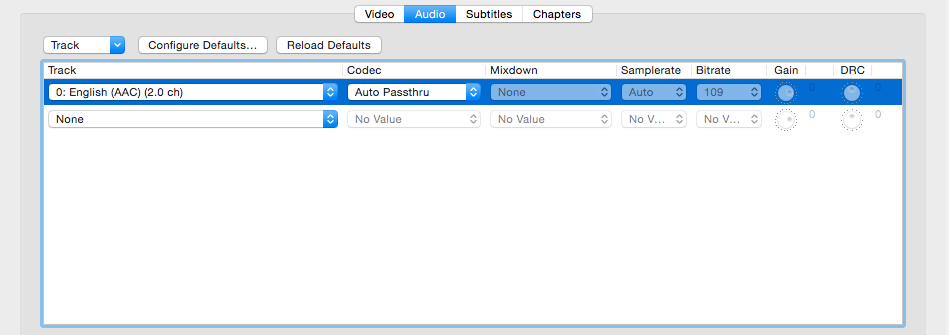
There are lots of options we can set up in HandBrake. It turns out that one of them is the key to resolving the sound issue. The audio setup that Auto Passthru is chosen as the following figure can bypass the issue, so that provides a proper stereo sound smoothly.

20290925573_8d42ac8f3c_o.png


Creative Commons License
This work is licensed under a Creative Commons Attribution-NonCommercial-ShareAlike 4.0 International License.
Created: 2015-08-27 Thu 02:53

Emacs 24.3.1 (Org mode 8.2.10)

Saturday, July 4, 2015

gif onto Flickr in OSX

GIF to Flickr

GIF to Flickr


This post is written with e[ ⎋Esc ]m[ ⌥Meta ]a[ ⌥Alt ]c[ ^Ctrl ]s[ ⇧Shift ] org-mode.


System Environments

Operating Systems

  • Main- : OS X Yosemite (10.10.4)
  • Sub- : Debian GNU/Linux Wheezy (7.8)
  • Server: Debian GNU/Linux Wheezy || Squeeze
  • Mobile: iOS 7.1.2

A way to upload a gif to Flickr in OSX

A GIF image is not officially supported in Flickr. Whenever you want to upload a gif into Flickr, it would give an error message back to you. There however would be a way to upload it. I'm not sure whether it's a bug or not, but it seems to work by now.

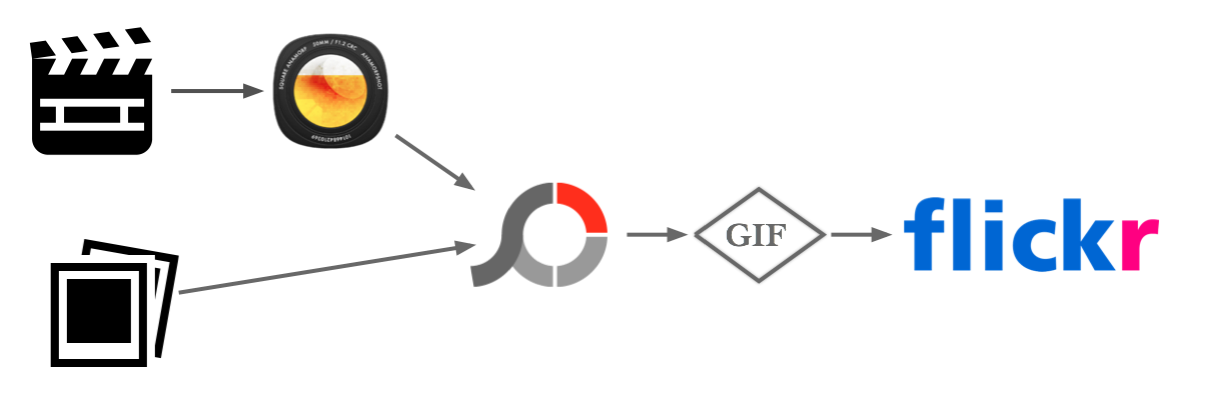
Here a way I want to show you is kinda a detour. The Key is PhotoScape X. It doesn't matter which software you used in order to make a gif in a first step. Once it goes through PhotoScape X after no matter how you made it, it can be oddly and interestingly possible to upload it to Flickr.

For example, I've made a gif file in two ways. One is from directly images by virtue of PhotoScape X. Another is first making a move via Screeny or QuickTime Player, and then a gif via GIFBrewery. If it is from a movie, then I use PhotoScape X even though it doesn't seem to be necessary. Everything I made has been succeeded in uploading it onto Flickr.

Long story short, if you use PhotoScape X at the end, then it is possible to upload it onto Flickr.

19215905630_2f6abc82a9_o.png

FYI) The reader should be reminded that

  • GIF Brewery is a commercial software. It costs you $4.99.
  • PhotoScape X is a free software and the latest version # is 2.2. But I recommend PhotoScape X 1.8 having no commercial appearing. The others including an AppStore for Mac version keep showing commercial.
  • PhotoScape X is highly beneficial to keep in you OSX, though it looks quite out of an OSX native app style.

Examples uploaded onto Flickr

18279671760_cb3f05861b_o.gif

Figure 2: English/Korean spell-checker in Emacs 24.3, OS X

18593934593_38fdf011f0_o.gif

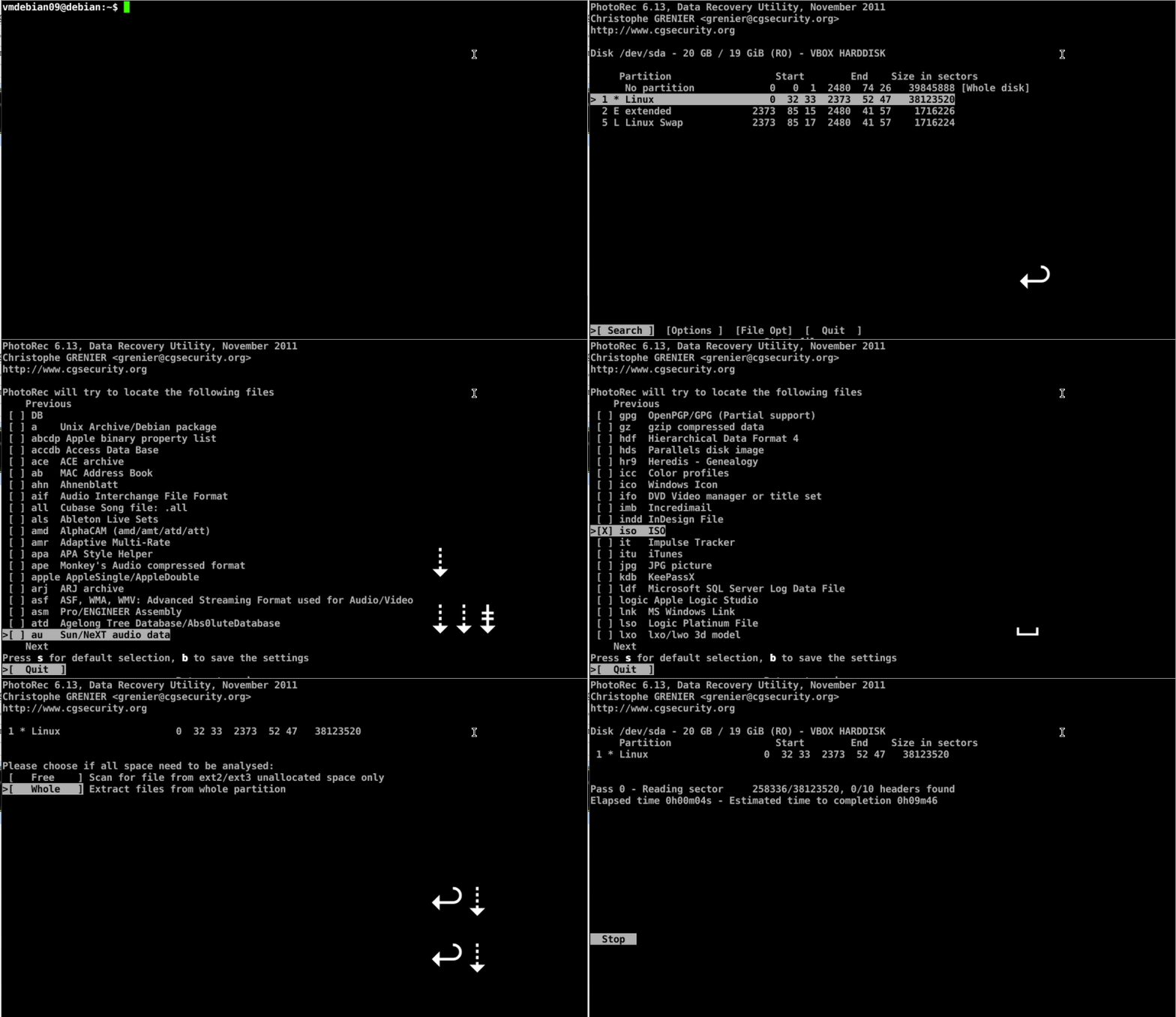
Figure 3: Workflow of PhotoRec in Debian 7.8


Creative Commons License
This work is licensed under a Creative Commons Attribution-NonCommercial-ShareAlike 4.0 International License.
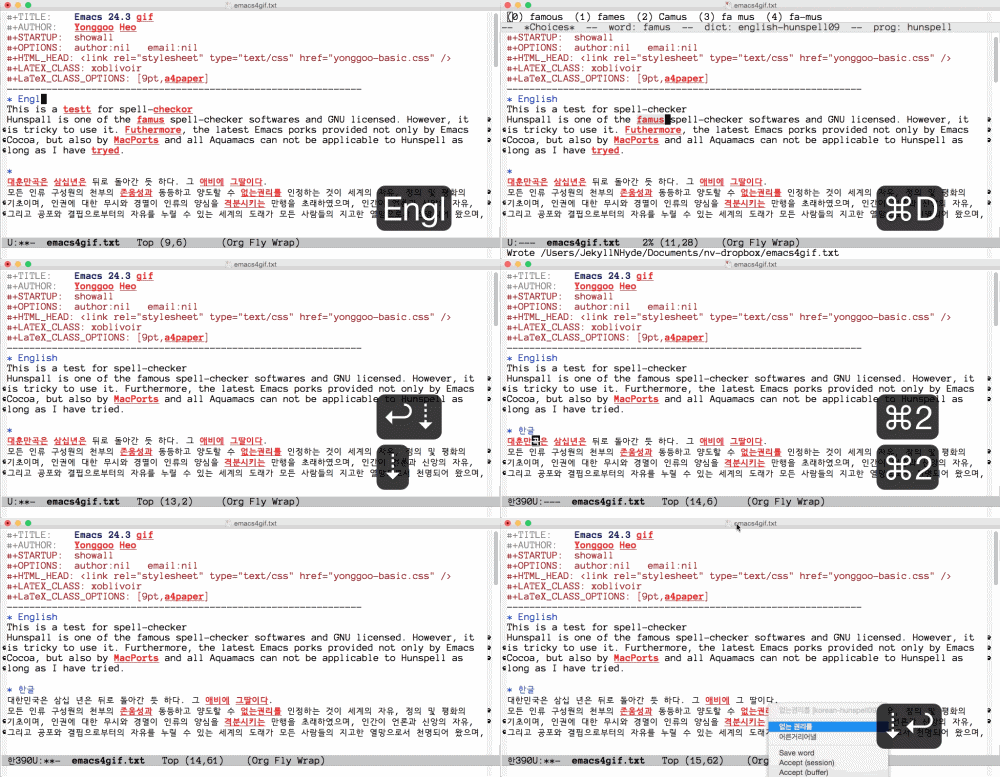
Image sources:

  • The PhtoScape X icon from the Homepage, COPYRIGHT (C) 2001-2015 MOOII TECH ALL RIGHTS RESERVED.
  • The GIF Brewery icon from Homepage, © GIF Brewery.
  • The Flickr icon from Wikipedia, © Flickr.
  • Other icons used in images are from simpleicon, Copyright © 2014 Free Icons.

Created: 2015-07-04 Sat 12:56

Emacs 24.3.1 (Org mode 8.2.10)

Tuesday, June 30, 2015

trimforce enable

Trim in OSX 10.10.4

Trim in OSX 10.10.4


이 문서는 e[ ⎋Esc ]m[ ⌥Meta ]a[ ⌥Alt ]c[ ^Ctrl ]s[ ⇧Shift ] org-mode로 작성된 글입니다.


System Environments

Operating Systems

  • Main- : OS X Yosemite (10.10.4)
  • Sub- : Debian GNU/Linux Wheezy (7.8)
  • Server: Debian GNU/Linux Wheezy || Squeeze
  • Mobile: iOS 7.1.2

지난 번에 ONE™님이 언급한 데로, OSX 10.10.4부터 3rd-party application의 도움 없이 OS단에서 사용자가 직접 설치한 3rd-party SSD에 대한 Trim 지원이 가능해졌다.

실행 법은 허무하리 만큼 간단하다. Terminal.app을 켜서 아래 한 줄을 실행하자.

$ sudo trimforce enable

y(Yes)를 두 번 누르게 되고 조금 기다리면 저절로 restart된다.

19300069452_3cd82dbd4c_o.png

데이터 손실이 있을 수 있으니, 백업을 하라고 경고 하고 있다.

그 후, [System Information]에 들어가면 Trim이 활성화되어 있는 것을 볼 수 있다.

19300069242_1beac814c2_o.png

FYI) 그 전까지 TrimEnabler를 쓰고 있었는데, 10.10.4로 업그레이드 시 특별히 Trim을 끄고 실행하지는 않았고, 업그레이드 후 TrimEnabler는 지우고 백업을 한 후, sudo trimforce enable 를 실행하였다.


Creative Commons License
This work is licensed under a Creative Commons Attribution-NonCommercial-ShareAlike 4.0 International License.
Created: 2015-06-30 Tue 23:33

Emacs 24.3.1 (Org mode 8.2.10)

Wednesday, June 3, 2015

Emacs Spell-checker English/Korean

Emacs Spell-checker English/Korean

Emacs Spell-checker English/Korean


This post is written with e[ ⎋Esc ]m[ ⌥Meta ]a[ ⌥Alt ]c[ ^Ctrl ]s[ ⇧Shift ] org-mode.

이 문서는 e[ ⎋Esc ]m[ ⌥Meta ]a[ ⌥Alt ]c[ ^Ctrl ]s[ ⇧Shift ] org-mode로 작성된 글입니다.


System Environments

Operating Systems

  • Main- : OS X Yosemite (10.10.3)
  • Sub- : Debian GNU/Linux Wheezy (7.8)
  • Server: Debian GNU/Linux Wheezy || Squeeze
  • Mobile: iOS 7.1.2

Ispell-word and the secondary click within Flyspell on

Needless to say, the GIF below is self-explanatory.

English/Korean spell-checker in Emacs 24.3, OS X

The work-flow was captured under Hunspell with Emacs Cocoa 24.3 in OSX. Hunspell was activated for English/Korean. Shortcuts I set are ⌘d for ispell-word and ⌘2⌘2 for the spell-checking pop-up window. For the former, you can select a word you want by typing a digit. The latter is technically nothing but the secondary click(or right click) at a mouse point on a word underscored by Flyspell On. I made the key-binding for it by ⌘2⌘2. Though the gif above shows way in Emacs Cocoa under OSX, it is completely possible in GNU Emacs under Linux.

FYI) ⌘⎵ in the gif indicates the shortcut I set for ispell-change-dictionary.

Requirements

  • Hunspell for Emacs cocoa 24.3 in OSX or for GNU Emacs 23.4/24.3 in Debian GNU/Linux

It is not dealt with in this post, because I explained it already. You can see the details by clicking one of the links followed.

There are descriptions for a simple way to change both input methods and hunspell dictionaries as well.

Instruction

Typing ispell-word after ⌥x (M-x in typical Emacs notation) would be enough for some users to check spelling. However, what I want to say is how to set up a key-stroke for the spell-checking pop-up window once the flyspell is on.

  1. Set flyspell-mode on for text-mode by adding the line
    '(text-mode-hook (quote (turn-on-flyspell text-mode-hook-identify)))
    

    into your Emacs preference file, i.e. ~/.emacs. For instance,

    (custom-set-variables
    ;; custom-set-variables was added by Custom.
    ;; If you edit it by hand, you could mess it up, so be careful.
    ;; Your init file should contain only one such instance.
    ;; If there is more than one, they won't work right.
    '(cua-mode t nil (cua-base)) ;;<--- let c-x c-c c-v work
    '(text-mode-hook (quote (turn-on-flyspell text-mode-hook-identify))) ;;<--- flyspell
    )
    

    The basic to read an elisp source is that anything after ;; is a comment, so that doesn't affect Emacs at all.

  2. Activate ⌘2⌘2 for the secondary click(or right click) at an underscored word by adding the following elisp code to ~/.emacs
    ;; \\\\\\\\\\\\\\\\\\\\\\\\\\\\\\\\\\\\\\\\\\\\\\
    ;; \\\\\[Body III-a.] For keyboard strokes for spelling check
    ;; \\\\\\\\\\\\\\\\\\\\\\\\\\\\\\\\\\\\\\\\\\\\\\
    (global-set-key [\s-mouse-2] 'flyspell-correct-word)   ;; <--- step 0/2 for s-2 s-2
    ;; ------------------------------
    ;; ---> function 1
    ;; ------------------------------
    (defun make-mouse-event-at-point (base-event)
    (let ((posn (posn-at-point))
      (prefix "")
      (basic-type (event-basic-type base-event))
      (modifiers (event-modifiers base-event)))
    (cond
    ((and (integerp basic-type) (>= basic-type ?0) (<= basic-type ?9))
    ;; click
    (let* ((mouse-type (intern (format "%smouse-%d" prefix (- basic-type ?0))))
           (click-count 1)
           (type (event-convert-list (append modifiers (list mouse-type)))))
      (list type posn click-count)))
    (t
    (error "Unsupported key for mouse event: %s" (event-basic-type base-event)))
    ))
    )
    ;; ------------------------------
    ;; ---> function 2
    ;; ------------------------------
    (defun simulate-mouse-event-at-point ()
    (interactive)
    (let ((event (make-mouse-event-at-point last-input-event)))
    (setq unread-command-events (cons event unread-command-events))))
    ;; ------------------------------
    ;; ---> function 3
    ;; ------------------------------
    (defvar simulate-mouse-event-map (make-sparse-keymap))
    (global-set-key (kbd "s-2") simulate-mouse-event-map)   ;; <--- step 1/2 for s-2 s-2
    ;; ------------------------------
    ;; #####!!! final step, i.e step 2/2 for keyboard stroke for mouse#-click
    ;; ------------------------------
    (define-key simulate-mouse-event-map [t] 'simulate-mouse-event-at-point)
    

    When you use the exactly same elisp above in GNU Emacs under Linux, the shortcut must be ⊞Win-2 ⊞Win-2 in a non-apple keyboard. If you want to change it to C-2 C-2, then it can be done after replacing s- and \s- with C- and \C- respectively.

FYI) In GNU Emacs under Linux, C, M, S, and s stand for Ctrl, Meta, Shift, and super-key (a.k.a. Windows key) respectively.

Acknowledgement

I acknowledge Gilles from StackExchange's debt to almost every elisp code here. You can find his source code explicitly in HERE.

Epilog, 한글 사용자를 위하여

Emacs에서 맞춤법 검사는, ⌥x (M-x Emacs 기본 표기) 후 ispell-word 로 간단히 실행할 수 있다. Flyspell mode(틀린 맞춤법에 밑줄 그어짐)이 켜있는 경우에는, 밑줄 그어진 단어 위에서 우클릭하면 팝업창이 뜨고 화살표키로 선택하는 방법으로도 사용할 수 있다. 영어의 경우는 특별한 사전을 설치하지 않아도 바로 검사할 수 있음은 물론이다. 한글 맞춤법 검사는 현재로는 hunspell이 거의 유일무이한 대안인데, 영어와 함께 이를 활성화 하는 방법은 지난 Posts에서 설명했다.

OSX Yosemite 전까지는 Aquamacs에서 ispell-word (or ispell-region)으로 영어/한글 맞춤법 모두를 해결해 왔었다. 바람입력기로 OSX 차원이 아닌 Aquamacs 자체에서 입력소스를 변경하고, 영어 맞춤법은 Aquamacs에서 기본으로 제공하는 것으로 한글 맞춤법은 OSX 차원에서 설치한 Korean hunspell dictionary로 약간은 변칙을 써왔었다. 당시에도 Aquamacs에서 Hunspell을 동작하게 하는 방법을 많이 시도했으나 다 무위로 돌아갔었고, 이 변칙 방법으로도 잘 작동하니 문제 없이 사용했었다. 물론, OSX 단에서 설치한 이 한글 사전은 Aquamacs는 물론 다른 프로그램에서도 잘 돌았었다.

OSX Yosemite 후, 모든 것이 달라졌다. OSX 단에서 설치한 한글 사전은 어디에서도 제대로 동작하지 않았다. BACK TO THE MAC에서 항상 추천하는 한글 맞춤법 검사기 "단디" 역시 나에게는 해당 사항이 없었다. 왜냐하면, 단축키를 지정해도 Emacs던 Aquamacs던 동작하지 않고, 설혹 가능해도 단순히 확인할 수 있을 뿐 수정은 직접 해주어야 하는 점 때문이다. 나에게는 Hunspell이 필요했다.

모든 문제의 시작은 Hunspell임을 직감하고, 어떻게 해도 이를 활성화 할 수 없었던 Aquamacs를 포기하고 Original GNU Emacs에 가장 가깝다고 하는 Emacs Cocoa로 전환하기로 결정했다. 다행히, OSX Yosemite Emacs Cocoa에서 Hunspell을 쓰는 방법을 찾았다. (Linux에서 GNU Emacs로 hunspell 이용은 사실 자명하다.) 이는 위에서 언급한 지난 두 글에서 자세히 설명했지만, 핵심은 OS 마다 적절한(?) Emacs version을 써야 하는 점이다. 그러면 문제 해결은 비교적 간단하다.

언제나 그렇듯이, 한글이 항상 문제(?)다. 어지간히 Emacs에서 한글을 써본 사람은 다 알겠지만, Linux를 제외한 OS에서 OS 단에서 제공하는 한/영 변환은 항상 문제를 일으키므로, Emacs 자체에서 제공하는 입력 소스 변환을 쓰는 것이 항상 추천된다. 이는 OSX Yosemite에서도 바람입력기를 통해 간단히 해결할 수 있다. Hunspell을 Emacs에서 쓸 수 있게 된다 하더라도 문제는 크게 두 가지가 남아있다.

첫째, ⌥x (M-x Emacs 기본 표기) ispell-word 후 *Choices* buffer 에서 한글이 잘린다

한글 잘림 in *Choices* buffer

이는 한글과 영어를 다른 크기로 지정함으로써, 어느 정도 해결 가능하다. 아래는 영어는 Anonymous Pro 10으로, 한글은 HCR Dotum LVT 16으로 만든 경우이다.

;; Setup different font family and size for English/Korean
(setq default-frame-alist
      '(
	(top . 0) (left . 182) (width . 96) (height . 36)   ---> window position and size
	))
(when (eq system-type 'darwin)
  (set-face-attribute 'default nil :family "Anonymous Pro")
  default font size (point * 10)
  (set-face-attribute 'default nil :height 195)
  (set-fontset-font t 'hangul (font-spec :name "HCR Dotum LVT-16"))
  )

이렇게 하면 한글 폰트 크기가 전반적으로 바뀌면서, *Choices* buffer 에서도 한글이 잘리지 않는다. 두벌식 사용자라면, ispell-word 단축키만 따로 지정해도 적당히 쓸 만한 환경을 구축할 수 있다.

나는 세벌식390 사용자다. 문제가 심각해졌다. Emacs 자체 입력 소스를 설정하면 한글 세벌식 입력 환경에서 *Choices* buffer 안에서 단어 선택이 안된다. Emacs 자체 입력 소스를 끄고, OSX 입력 소스를 쓰면 *Choices* buffer 안에서 단어 선택은 되지만, ⌥x 같은 Emacs 단축키가 안먹는다!!! 어떤 세벌식을 쓰는 지와는 무관하게 세벌식 모두(보통, 390, 최종)에서 다 안된다. 이는 Yosemite 이전에 Aquamacs (Aquamacs 2.5x 이하 버전) 사용 시는 발생하지 않는 문제였다.이 문제를 해결하기 위해서 Flyspell-mode에서 마우스 우클릭하면 팝업창이 뜨는 것에 착안, 이를 키보드로 쓸 수 있는 방법을 여기서 기술했다. 이 방법은 당연하게도 두벌식이든 세벌식이든 상관없다. 게다가 ispell-word 를 쓸 때에도 불만이었던, "화살표키로 단어선택이 안되던 문제"에서 자유롭다. 가능한 한 키보드로 모든 것을 해결하려는 이들에게 숫자키로 가는 손가락은 화살표키보다 불편하다.

지난 글과 여기에서 설명하려한 방법의 목적을 다시 정리하자면, " 어떤 한글 입력 방법을 쓰던 상관 없이 Emacs에서 맞춤법 검사 과정 전부를 키보드로 해결하자! "이다. Emacs 버전을 타는 경향이 있지만, 이는 OSX 전반은 물론 Debian GNU/Linux에서도 큰 수정 없이 바로 쓸 수 있는, 현재로써는 가장 완벽한 해결책이다.


Creative Commons License
This work is licensed under a Creative Commons Attribution-NonCommercial-ShareAlike 4.0 International License.

Created: 2015-06-04 Thu 11:21

Emacs 24.3.1 (Org mode 8.2.10)

Saturday, May 30, 2015

Hunspell for Emacs in OSX

Hunspell for Emacs in OSX

Hunspell for Emacs in OSX


This post is written with e[ ⎋Esc ]m[ ⌥Meta ]a[ ⌥Alt ]c[ ^Ctrl ]s[ ⇧Shift ] org-mode.


System Environments

Operating Systems

  • Main- : OS X Yosemite (10.10.3)
  • Sub- : Debian GNU/Linux Wheezy (7.8)
  • Server: Debian GNU/Linux Wheezy || Squeeze
  • Mobile: iOS 7.1.2

Hunspell and Emacs under OSX

Hunspall is one of the famous spell-checker softwares and GNU licensed. However, it is tricky to use it. Furthermore, the latest Emacs porks provided not only by Emacs Cocoa, but also by MacPorts and all Aquamacs can not be applicable to Hunspell as long as I have tried. Frankly speaking, the only way I know how to make Hunspell work in Emacs is the Emacs Cocoa 24.3.1 Installation of hunspell is done by means of MacPorts. Note that a English-Korean multilingual environment is taken in this post as an example.

Additionally, dictionary-toggling in Emacs will be at issue of this post as well.

Instruction for Hunspell in Emacs Cocoa with English-Korean under OSX

  1. It assumed that MacPorts were already installed, so that ready to use.
  2. Install Hunspell and its English library via MacPorts
    $ sudo port install hunspell hunspell-dict-en_US
    
  3. See paths for hunspell and hunspell-dict-en_US by running
    $ hunspell -D
    

    They must be /opt/local/bin/hunspell and /opt/local/share/hunspell/en_US.

  4. Download Hunspell dictionary for Korean: Homepage, download page, or "direct download"
  5. After unzipped ko-aff-dic-0.5.6.zip, locate two files ko.aff and ko.dic into ~/Library/Spelling/.
  6. Open the Emacs preference file ~/.emacs and add library-information as the following elisp
    (setq ispell-local-dictionary-alist
    '(
      ("english-hunspell"
       "[A-Za-z]" "[^A-Za-z]" "[0-9a-zA-Z]" t
       ("-d" "/opt/local/share/hunspell/en_US")   ;; <--- exact path
       nil utf-8)
      ("korean-hunspell"
       ;; "[가-힝]" "[^가-힝]" "[0-9a-zA-Z]" nil   ;; <--- emacs 22이하
       "[가-힣]" "[^가-힣]" "[0-9a-zA-Z]" nil   ;; <--- emacs 23이상
       ("-d" "/Users/JOHN/Library/Spelling/ko")   ;; <--- JOHN indicates you in OSX
       nil utf-8)
      ;; ("german-hunspell"
      ;;  "[a-zäöüßA-ZÄÖÜ]" "[^a-zäöüßA-ZÄÖÜ]" "[']" t
      ;;  ("-d" "de_DE")
      ;;  nil utf-8)
      )
    )
    

    Remember that a) you have to use exact paths ,not like ~ for your home directory and b) JOHN above must be replaced by your name in OSX. FYI) If you wanna use a triple lingual environment such as German together, you can uncomment the last four sentences and modify a library.

  7. And put the Hunspell information
    (setq ispell-program-name "/opt/local/bin/hunspell"   ;; <--- exact path in OSX 10.10
          ispell-dictionary "english-hunspell")
    (setq ispell-really-hunspell t)   ;; <--- optional??? working w/o it in emacs(cocoa)
    

Toggle libraries

It must be great to change libraries with a keyboard stroke, like ^\ (C-\ in typical Emacs notation) for toggle-input-method rather than type it after ⌥x (M-x in typical Emacs notation). I set the toggle for libraries by ⇧SPC (S-SPC in typical Emacs notation). Add the following into ~/.emacs

;; ### korean-english
(let ((langs '("korean-hunspell" "english-hunspell")))
  (setq lang-ring (make-ring (length langs)))
  (dolist (elem langs) (ring-insert lang-ring elem)))
(defun cycle-ispell-languages ()
  (interactive)
  (let ((lang (ring-ref lang-ring -1)))
    (ring-insert lang-ring lang)
    (ispell-change-dictionary lang)))
;; ### key bindings
(global-set-key (kbd "S-SPC") 'cycle-ispell-languages)

Creative Commons License
This work is licensed under a Creative Commons Attribution-NonCommercial-ShareAlike 4.0 International License.

Footnotes:

1

Exact version of the Emacs Cocoa working with Hunspell is 24.3.1. Other versions I have tested are 24.5-1, 24.4, and 23.4, which all I failed to use smoothly.


Created: 2015-05-30 Sat 21:01

Emacs 24.3.1 (Org mode 8.2.10)

Saturday, May 23, 2015

OSX Yosemite

OSX Yosemite

OSX Yosemite


;; =================================================
;; εμαcs is ⎋[esc]⌘[meta]⌥[alt]⌃[ctrl]⇧[shift].
;; =================================================

This post is written with emacs org-mode.


이 문서는 emacs org-mode로 작성된 글입니다.


System Environments

Operating Systems

  • Main- : OS X Yosemite (10.10.3)
  • Sub- : Debian GNU/Linux Wheezy (7.8)
  • Server: Debian GNU/Linux Wheezy || Squeeze
  • Mobile: iOS 7.1.2

Hardware Systems

  • OSX installed : MacBook Pro(13-inch, Mid 2009) 2.53 GHz Intel Core 2 Duo
  • Debian installed : Zotac ZBOX ID12 Intel Atom D525

Yosemite

7-month-late upgrading to Yosemite has done after its release. It's not a good time to say something generally useful. I wanna make a few comments for particular things that are quite valuable to me, not to everyone.

Brief lists

My indispensable applications, such as Quicksilver, Aquamacs(2.5x), baram(Input Method), MATHEMATICA(8) are smoothly working and so is MacPorts for installation of LaTeX, gcc, etc. It would be a good start.

OK w/o any upgrade

  • Aquamacs 2.5x, Photoscape X 1.8, Skype 6.17x, TeamViewer 9, Acrobat 9, MATHEMATICA 8
  • baram (1.5.2), Quicksilver(1.2.2), Veusz(1.23), EzPlusforMac, AppCleaner, EasyFind, HandBrake, Max, MPlayer X, VLC, KeyCastr, Screeny, Sublime Text 2, BugsMusicDownloadManager, VirtualBox, ATOM, TextMate(2.0-β.7.1)
  • StartupSound diabled, source codes in Quicklook(⌘y or Spacebar)

Applications on top are of older versions, because of my personal purpose. There is no difficulty for using them in OSX Yosemite at all.1

The disabled OSX StartupSound is being as it was done in Mavericks. Color syntax for source codes in Quicklook(⌘y or Spacebar) of Finder or Quicksilver turns off at first. But it can be easily turned on by opening TextMate(2.0-β.7.1) once as it was done in Mavericks or earlier.

OK, but ugprade available or required

  • 1Password(5.3), DEVONThink(2.8.5), Skim(1.4.11), BibDesk(1.6.4), CyberDuck(4.7), Prizmo(3.1.2),
  • GPG, Trim Enabler
  • MacPorts: gcc

You could see an warning message like GPG mail is not compatible to Yosemite. It's gonna located in /incompatible applications. Solution is simple. After upgrading is done, you can download the GPG Suite for For OS X 10.10 Yosemite from the homepage and feely delete the older version. I did't turn off the trim before upgrading from Mavericks to Yosemite by means of Trim Enabler, but had no error fortunately. Trim turns off automatically and I could do it manually on via Trim Enabler in Yosemite.

LaTeX and gcc48 were installed in Mavericks via MacPorts. LaTeX sources turn out to be directly compilable by commands, pdflatex, xelatex, etc. But gcc does not. During compiling you could see an error message like gcc: warning: couldn't understand kern.osversion '14.3.0, even though MacPorts is upgraded and sudo port selfupdate is done in Terminal. It can be also easily resolved by installation of gcc49 via MacPorts. FYI) you may need to install gcc_select as well in order to link gcc to gcc-mp-4.9.

Newly installed

  • Java 1.6.0.jdk

Things annoying

  1. Default Font is disgusting. It has been well-known, but worse than my expectation. It literally disgusts me.
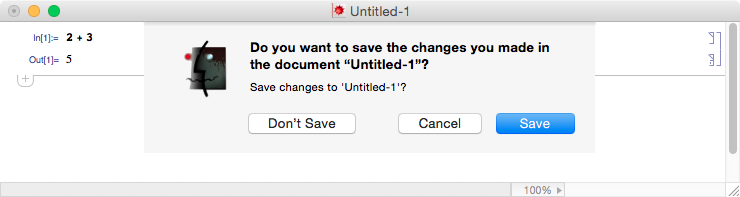
  2. tab[↹] key is not working in a dialog box for MATHEMATICA. It is supposed to be once All controls is selected under [System Preferences]->[Keyboard]->[Shortcuts] as the other else. MATHEMATICA is the only application that doesn't work. For the time being, the only option to use a keyboard stroke is use of shortcuts: ⌘d for "Don't save", ⌘r for "Replace", ⎋ for "Cancel", etc.
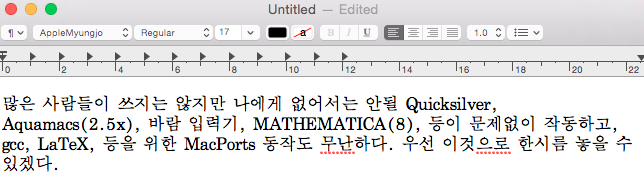
  3. Korean-spelling check is systemwidely dysfunctional. It is not an useful information for english-speaking people.

17381170424_84ac4c25b0_o.png

A dialog box in MATHEMATICA

요세미티(Yosemite)

무려 7개월이나 지나서 Yosemite 업그레이드를 했다. 너무 늦어서 유용한 정보를 포스팅하기는 어려울 것 같고, 많은 사람들이 쓰지는 않지만 나는 유용하게 쓰는 것들을 위주로 간단한 느낌을 적어보려한다.

간단한 리스트

나에게 없어서는 안될 Quicksilver, Aquamacs(2.5x), 바람입력기, MATHEMATICA(8), 등이 문제없이 작동하고, gcc, LaTeX, 등을 위한 MacPorts 동작도 무난하다. 우선 이것으로 한시름 놓을 수 있겠다.

바로 잘 동작하는 것들

  • Aquamacs 2.5x, Photoscape X 1.8, Skype 6.17x, TeamViewer 9, Acrobat 9, MATHEMATICA 8
  • 바람입력기(1.5.2), Quicksilver(1.2.2), Veusz(1.23), EzPlusforMac, AppCleaner, EasyFind, HandBrake, Max, MPlayer X, VLC, KeyCastr, Screeny, Sublime Text 2, BugsMusicDownloadManager, VirtualBox, ATOM, TextMate(2.0-β.7.1)
  • StartupSound diabled, source codes in Quicklook(⌘y or Spacebar)

맨위의 목록은 이유가 있어서 옛버전을 쓰는 것인데, Yosemite에서 잘 동작했다.2

OSX 시작음(StartupSound)은 Mavericks에서 했던데로 계속 무음으로 된다. Finder나 Quicksilver에서 Quicklook(⌘y or Spacebar)로 source codes를 볼 때 color syntax는 풀려서 안되다가, Mavericks에서 했던데로 TextMate(2.0-β.7.1)를 한 번 열면 잘 먹는다.

업그레이드를 요구하거나 가능한 것들

  • 1Password(5.3), DEVONThink(2.8.5), Skim(1.4.11), BibDesk(1.6.4), CyberDuck(4.7), Prizmo(3.1.2),
  • GPG, Trim Enabler
  • MacPorts: gcc

GPG mail은 Yosermite 설치 도중에 호환되지 않는다는 경고가 뜨고 /incompatible applications 아래에 남음. 따로 홈페이지에서 업그레이드 가능하고, 전버전은 지워버리면 된다. Mavericks에서 Trim Enabler로 Trim을 끄지 않고 Yosemite로 업그레이드했으나, 문제는 일으키지 않았다. Trim은 저절로 꺼졌으며, Trim Enabler로 Yosemite에서 다시 켤 수 있었다.

Mavericks에서 LaTeX과 gcc48을 MacPorts로 설치해서 쓰고 있었는데, Yosemite로 업그레이드 후에도 LaTeX(pdflatex, xelatex, etc)은 바로 쓸 수 있었다. LaTeX은 되면 손대지 않는 것이 상책이니 당분간(?) 그냥 쓸 것이다. 문제는 gcc인데, 컴파일시 에러를 토해냈다. MacPorts 업그레이드와 sudo port selfupdate 후에도 문제는 고쳐지지 않았으나, gcc49 설치로 깔끔하게 해결됐다. gcc_select 는 Mavericks에서 설치했었는데, 따로 설치하지 않아도 Yosemite에서 gcc가 gcc49 알아서 잘 찾더라.

새로 설치한 것(Newly installed)

  • Java 1.6.0.jdk

몇가지 구리구리한 것들

  1. 폰트 가독성이 토나온다. 얘기는 익히 들었으나 이 정도일 줄은 몰랐다. 말그대로 어지러워 토나온다.
  2. MATHEMATICA 대화 상자에서 tab[↹] 키가 먹지 않는다. 물론, [System Preferences]->[Keyboard]->[Shortcuts]에서 All controls 선택은 이미 설정했다. 다른 프로그램에서는 잘 동작하는데, 유독 MATHEMATICA만 그렇다. 현재로서는 키보드 단축키가 유일한 해결책으로 보인다. 이를테면, ⌘d for "Don't save", ⌘r for "Replace", ⎋ for "Cancel", etc.
  3. Aquamacs에서 한글 맞춤법검사가 이상 동작한다. 이건 비단 Aquamacs만의 문제 아니다. 다른 편집기에서도 같은 증상을 보이는 것으로 보아, 지금 쓰고 있는 hunspell 문제로 보이는데… 대안이 있나 모르겠다.

17381170424_84ac4c25b0_o.png

A dialog box in MATHEMATICA

17383243883_23068602f2_o.png

Korean in Aquamacs

17977305976_32c7546023_o.png

Korean in TextEdit

Epilog

사실 Mavericks를 잘 쓰고 있었고 내 MacBook Pro는 낡은데다 이미 너무 늦어서 Yosemite는 건너뛰려고 했었다. 개인적으로 안 좋은 일이 너무 많은 지난 일년을 정리하고, 앞인지 옆이지 모르지만 우선 좀 발을 떼보려는 수작으로 OS 업그레이드를 단행했다. 아직 뭔가 많이 달라진 것은 없지만, 기분은 새롭다.


Creative Commons License
This work is licensed under a Creative Commons Attribution-NonCommercial-ShareAlike 4.0 International License.

Footnotes:

1

The recent versions of Aquamacs have a problem to use Korean. 2.5x is the latest version functioning with it. Photoscape X 1.8 has no commercial appearing. The others including an AppStore for Mac version keep showing commercial.

2

Aquamacs의 최신버전은 한글 사용에 문제가 있어서 2.5x를 유지하고 있고, Photoscape X는 AppStore for Mac 버전과 최신버전 모두 광고가 있어서 1.8을 유지하고 있다.


Created: 2015-05-24 Sun 01:46

Emacs 23.4.1 (Org mode 8.0.2)