Showing posts with label Korean. Show all posts

Saturday, May 30, 2015

Hunspell for Emacs in Debain

Hunspell for Emacs in Debain

Hunspell for Emacs in Debain


This post is written with e[ ⎋Esc ]m[ ⌥Meta ]a[ ⌥Alt ]c[ ^Ctrl ]s[ ⇧Shift ] org-mode.


System Environments

Operating Systems

  • Main- : OS X Yosemite (10.10.3)
  • Sub- : Debian GNU/Linux Wheezy (7.8)
  • Server: Debian GNU/Linux Wheezy || Squeeze
  • Mobile: iOS 7.1.2

Hunspell and Emacs in Debian GNU/Linux

Debian GNU/Linux Wheezy doesn't have Hunspell preinstalled, but does GNU Emacs by all means. The version of the default emacs in the system is 23.4.1, which can be seen under Bash with emacs --version. I have testified not only the default version of Emacs, but the manually compiled 24.3.2 version as well. The following will work for both.

Using hunsepll for GNU Emacs in Debian GNU/Linux is much simpler than that in OSX, because all needs can be easily installed and configured via Debian repositories, i.e. apt. Here a English-Korean multilingual environment is taken as an example.

Additionally, dictionary-toggling in Emacs will be also at issue of this post.

Installation and configuration

  1. Get necessary packages: Open Bash, and run
    $ sudo apt-get install hunspell hunspell-ko hunspell-en-us
    
  2. Check detailed information of Hunspell:
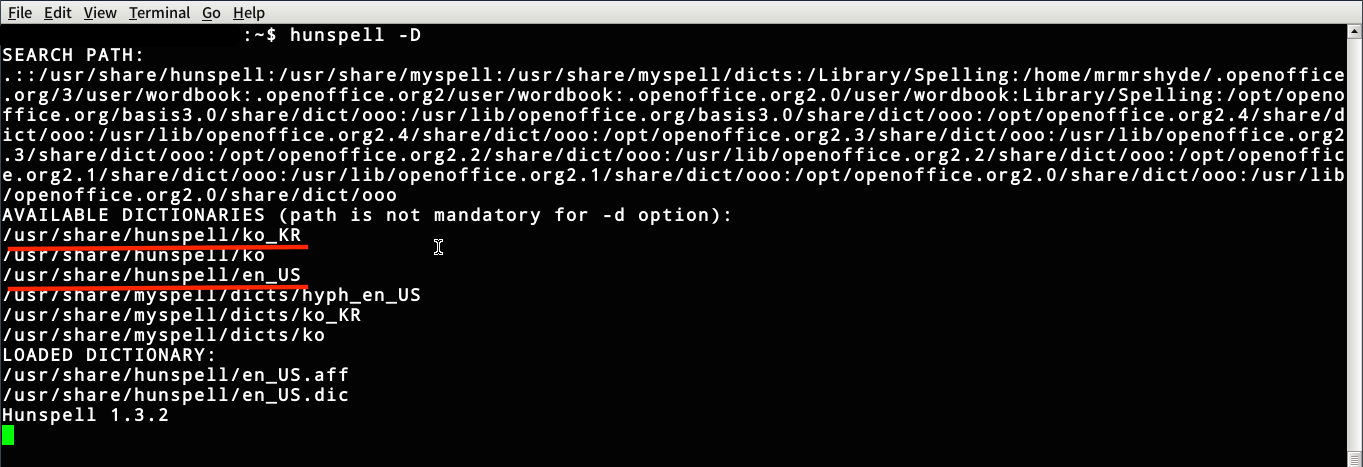
    $ hunspell -D
    

    Two most important things are a) being executable with the above command and b) dictionaries you installed. The later must be en_US and ko_KR. Information could be as similar as the screenshot of mine.
    17657609743_e07000deb4_o.png

    Figure 1: Hunspell information in Debian 7.8

  3. Open the Emacs preference file, i.e. ~/.emacs and add the following elisp code into it
    (setq ispell-local-dictionary-alist
    '(
      ("english-hunspell"
       "[A-Za-z]" "[^A-Za-z]" "[0-9a-zA-Z]" t
       ("-d" "en_US")
       nil utf-8)
      ("korean-hunspell"
       ;; "[가-힝]" "[^가-힝]" "[0-9a-zA-Z]" nil   ;; <--- emacs 22 or lower
       "[가-힣]" "[^가-힣]" "[0-9a-zA-Z]" nil   ;; <--- emacs 23 or higher
       ("-d" "ko_KR")
       nil utf-8)
      ;; ("german"
      ;;  "[a-zäöüßA-ZÄÖÜ]" "[^a-zäöüßA-ZÄÖÜ]" "[']" t
      ;;  ("-d" "de_DE")
      ;;  nil utf-8)
      )
    )
    (setq ispell-program-name "hunspell"
          ispell-dictionary "english-hunspell")
    (setq ispell-really-hunspell t)   ;; <--- optional??? working w/o it in emacs(cocoa)
    

    FYI) If you wanna use a triple lingual environment such as German together, you can uncomment the last four sentences and modify a library.

Toggle two dictionaries

If you can change libraries with a single keyboard stroke, like C-\ for toggle-input-method rather than type it after M-x, it must then be great. I set the toggle for libraries by S-SPC. And it works after adding the following into ~/.emacs

;; ;; ### korean-english
(let ((langs '("korean-hunspell" "english-hunspell")))
  (setq lang-ring (make-ring (length langs)))
  (dolist (elem langs) (ring-insert lang-ring elem)))
(defun cycle-ispell-languages ()
  (interactive)
  (let ((lang (ring-ref lang-ring -1)))
    (ring-insert lang-ring lang)
    (ispell-change-dictionary lang)))
;; ### key bindings
(global-set-key (kbd "S-SPC") 'cycle-ispell-languages)

Creative Commons License
This work is licensed under a Creative Commons Attribution-NonCommercial-ShareAlike 4.0 International License.

Created: 2015-05-30 Sat 22:43

Emacs 24.3.1 (Org mode 8.2.10)

Hunspell for Emacs in OSX

Hunspell for Emacs in OSX

Hunspell for Emacs in OSX


This post is written with e[ ⎋Esc ]m[ ⌥Meta ]a[ ⌥Alt ]c[ ^Ctrl ]s[ ⇧Shift ] org-mode.


System Environments

Operating Systems

  • Main- : OS X Yosemite (10.10.3)
  • Sub- : Debian GNU/Linux Wheezy (7.8)
  • Server: Debian GNU/Linux Wheezy || Squeeze
  • Mobile: iOS 7.1.2

Hunspell and Emacs under OSX

Hunspall is one of the famous spell-checker softwares and GNU licensed. However, it is tricky to use it. Furthermore, the latest Emacs porks provided not only by Emacs Cocoa, but also by MacPorts and all Aquamacs can not be applicable to Hunspell as long as I have tried. Frankly speaking, the only way I know how to make Hunspell work in Emacs is the Emacs Cocoa 24.3.1 Installation of hunspell is done by means of MacPorts. Note that a English-Korean multilingual environment is taken in this post as an example.

Additionally, dictionary-toggling in Emacs will be at issue of this post as well.

Instruction for Hunspell in Emacs Cocoa with English-Korean under OSX

  1. It assumed that MacPorts were already installed, so that ready to use.
  2. Install Hunspell and its English library via MacPorts
    $ sudo port install hunspell hunspell-dict-en_US
    
  3. See paths for hunspell and hunspell-dict-en_US by running
    $ hunspell -D
    

    They must be /opt/local/bin/hunspell and /opt/local/share/hunspell/en_US.

  4. Download Hunspell dictionary for Korean: Homepage, download page, or "direct download"
  5. After unzipped ko-aff-dic-0.5.6.zip, locate two files ko.aff and ko.dic into ~/Library/Spelling/.
  6. Open the Emacs preference file ~/.emacs and add library-information as the following elisp
    (setq ispell-local-dictionary-alist
    '(
      ("english-hunspell"
       "[A-Za-z]" "[^A-Za-z]" "[0-9a-zA-Z]" t
       ("-d" "/opt/local/share/hunspell/en_US")   ;; <--- exact path
       nil utf-8)
      ("korean-hunspell"
       ;; "[가-힝]" "[^가-힝]" "[0-9a-zA-Z]" nil   ;; <--- emacs 22이하
       "[가-힣]" "[^가-힣]" "[0-9a-zA-Z]" nil   ;; <--- emacs 23이상
       ("-d" "/Users/JOHN/Library/Spelling/ko")   ;; <--- JOHN indicates you in OSX
       nil utf-8)
      ;; ("german-hunspell"
      ;;  "[a-zäöüßA-ZÄÖÜ]" "[^a-zäöüßA-ZÄÖÜ]" "[']" t
      ;;  ("-d" "de_DE")
      ;;  nil utf-8)
      )
    )
    

    Remember that a) you have to use exact paths ,not like ~ for your home directory and b) JOHN above must be replaced by your name in OSX. FYI) If you wanna use a triple lingual environment such as German together, you can uncomment the last four sentences and modify a library.

  7. And put the Hunspell information
    (setq ispell-program-name "/opt/local/bin/hunspell"   ;; <--- exact path in OSX 10.10
          ispell-dictionary "english-hunspell")
    (setq ispell-really-hunspell t)   ;; <--- optional??? working w/o it in emacs(cocoa)
    

Toggle libraries

It must be great to change libraries with a keyboard stroke, like ^\ (C-\ in typical Emacs notation) for toggle-input-method rather than type it after ⌥x (M-x in typical Emacs notation). I set the toggle for libraries by ⇧SPC (S-SPC in typical Emacs notation). Add the following into ~/.emacs

;; ### korean-english
(let ((langs '("korean-hunspell" "english-hunspell")))
  (setq lang-ring (make-ring (length langs)))
  (dolist (elem langs) (ring-insert lang-ring elem)))
(defun cycle-ispell-languages ()
  (interactive)
  (let ((lang (ring-ref lang-ring -1)))
    (ring-insert lang-ring lang)
    (ispell-change-dictionary lang)))
;; ### key bindings
(global-set-key (kbd "S-SPC") 'cycle-ispell-languages)

Creative Commons License
This work is licensed under a Creative Commons Attribution-NonCommercial-ShareAlike 4.0 International License.

Footnotes:

1

Exact version of the Emacs Cocoa working with Hunspell is 24.3.1. Other versions I have tested are 24.5-1, 24.4, and 23.4, which all I failed to use smoothly.


Created: 2015-05-30 Sat 21:01

Emacs 24.3.1 (Org mode 8.2.10)