LaTeX with MMD or Org-mode with MathJax
This post is written with e[ ⎋Esc ]m[ ⌥Meta ]a[ ⌥Alt ]c[ ^Ctrl ]s[ ⇧Shift ] org-mode.
System Environments
Operating Systems
- Main- : OS X Yosemite (10.10.5)
- Sub- : Debian GNU/Linux Wheezy (7.9)
- Server: Debian GNU/Linux Wheezy || Squeeze
- Mobile: iOS 9.0.2
Table of Contents
$$ \newcommand{\dd}{\mathrm{d}} $$
A brief comment on MultiMarkdown
MultiMarkDown(MMD) with LaTeX, particularly mathematical formulae, isn't hard in any text editor supporting markdown preview. All we need is adding the following code probably on the beginning of your MMD file.
<script type="text/javascript"
  src="https://cdn.mathjax.org/mathjax/latest/MathJax.js?config=TeX-AMS-MML_HTMLorMML">
</script>
It's gonna automatically render a mathematical formula written in LaTeX into HTML by means of MathJax engine. List of softwares I've tested is
- Nebulous Notes in iOS
- nvALT in OS X
- MultiMarkdown Composer in OS X
- MacDown in OS X is poor.
- Atom with an MD package in OS X is bad.
Remember that an equation has to be enclosed by $ and $, \( and \), \\[ and \\], or etc. as suggested by MathJax or Fletcher T. Penney. For the others, you can follow the usual Markdown or Multi-markdown syntaxes.
Rendering MMD with LaTeX to HTML may not work properly as expected. Sadly, usage of LaTeX in MMD is not recommendable (yet) by comparison with Org-mode working perfectly. For example, an HTML output rendered from any of above first three would be seen appropriately in Safari (or Mobile Safari), but might not in the others like Firefox(or even not in Safari sometimes).
Nevertheless, it is worth mentioning that an MMD editor supporting MD preview would be a great alternative to use LaTeX in iOS, such as Nebulous Notes.
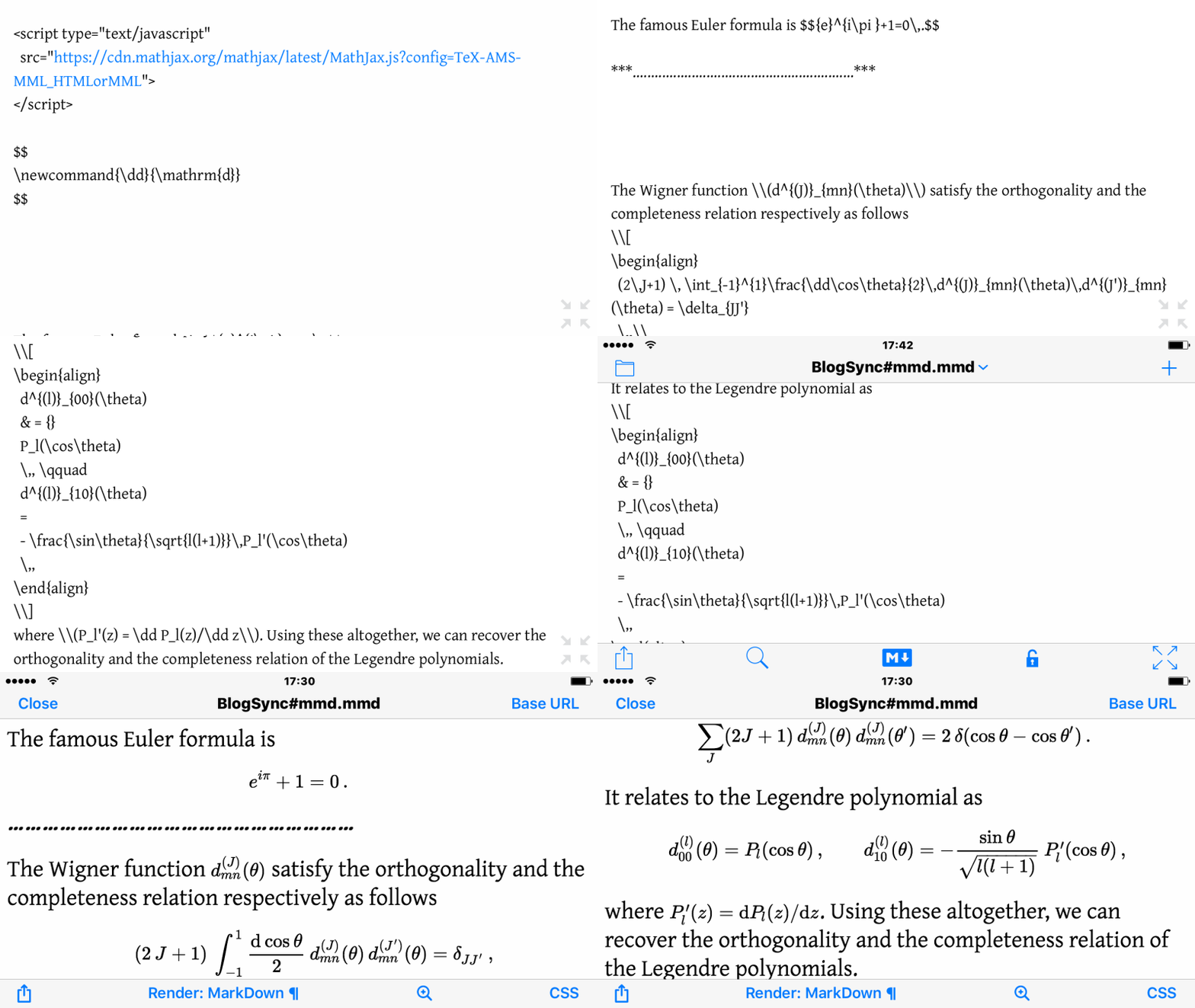
Figure 1: LaTeX and its rendering in Nebulous Notes
LaTeX example and a tip
In order to use a manual command you want, it can be easily done by putting the following code somewhere in your MMD file or Emacs Org-mode file. It works in both.
$$
\newcommand{\dd}{\mathrm{d}}
$$
I here present the almost same output from the one LaTeX expression w/ two different markup languages: MMD and Emacs Org-mode.
Output
The famous Euler formula is $${e}^{i\pi }+1=0\,.$$
……………………………………………………
The Wigner function \(d^{(J)}_{mn}(\theta)\) satisfy the orthogonality and the completeness relation respectively as follows
\begin{align} (2\,J+1) \, \int_{-1}^{1}\frac{\dd\cos\theta}{2}\,d^{(J)}_{mn}(\theta)\,d^{(J')}_{mn}(\theta) = \delta_{JJ'} \,,\\ \sum_{J}(2J+1)\,d^{(J)}_{mn}(\theta)\,d^{(J)}_{mn}(\theta') = 2\,\delta(\cos\theta - \cos\theta') \,. \end{align}It relates to the Legendre polynomial as
\begin{align} d^{(l)}_{00}(\theta) & = {} P_l(\cos\theta) \,, \qquad d^{(l)}_{10}(\theta) = - \frac{\sin\theta}{\sqrt{l(l+1)}}\,P_l'(\cos\theta) \,, \end{align}where \(P_l'(z) = \dd P_l(z)/\dd z\). Using these altogether, we can recover the orthogonality and the completeness relation of the Legendre polynomials.
Source for MMD
<script type="text/javascript"
  src="https://cdn.mathjax.org/mathjax/latest/MathJax.js?config=TeX-AMS-MML_HTMLorMML">
</script>

$$
\newcommand{\dd}{\mathrm{d}}
$$

The famous Euler formula is $${e}^{i\pi }+1=0\,.$$

***............................................................***

The Wigner function \\(d^{(J)}_{mn}(\theta)\\) satisfy the orthogonality and the completeness relation respectively as follows
\\[
\begin{align}
  (2\,J+1) \, \int_{-1}^{1}\frac{\dd\cos\theta}{2}\,d^{(J)}_{mn}(\theta)\,d^{(J')}_{mn}(\theta) = \delta_{JJ'}
  \,,\\
  \sum_{J}(2J+1)\,d^{(J)}_{mn}(\theta)\,d^{(J)}_{mn}(\theta') = 2\,\delta(\cos\theta - \cos\theta')
  \,.
\end{align}
\\]
It relates to the Legendre polynomial as
\\[
\begin{align}
  d^{(l)}_{00}(\theta)
  & = {}
  P_l(\cos\theta)
  \,, \qquad
  d^{(l)}_{10}(\theta)
  =
  - \frac{\sin\theta}{\sqrt{l(l+1)}}\,P_l'(\cos\theta)
  \,,
\end{align}
\\]
where \\(P_l'(z) = \dd P_l(z)/\dd z\\). Using these altogether, we can recover the orthogonality and the completeness relation of the Legendre polynomials.
Source for Emacs Org-mode
#+HTML_HEAD: <script type="text/javascript" src="https://cdn.mathjax.org/mathjax/latest/MathJax.js?config=TeX-AMS-MML_HTMLorMML"> </script>

$$
\newcommand{\dd}{\mathrm{d}}
$$

The famous Euler formula is $${e}^{i\pi }+1=0\,.$$

*............................................................*

The Wigner function $d^{(J)}_{mn}(\theta)$ satisfy the orthogonality and the completeness relation respectively as follows
\begin{align}
  (2\,J+1) \, \int_{-1}^{1}\frac{\dd\cos\theta}{2}\,d^{(J)}_{mn}(\theta)\,d^{(J')}_{mn}(\theta) = \delta_{JJ'}
  \,,\\
  \sum_{J}(2J+1)\,d^{(J)}_{mn}(\theta)\,d^{(J)}_{mn}(\theta') = 2\,\delta(\cos\theta - \cos\theta')
  \,.
\end{align}
It relates to the Legendre polynomial as
\begin{align}
  d^{(l)}_{00}(\theta)
  & = {}
  P_l(\cos\theta)
  \,, \qquad
  d^{(l)}_{10}(\theta)
  =
  - \frac{\sin\theta}{\sqrt{l(l+1)}}\,P_l'(\cos\theta)
  \,,
\end{align}
where $P_l'(z) = \dd P_l(z)/\dd z$. Using these altogether, we can recover the orthogonality and the completeness relation of the Legendre polynomials.

This work is licensed under a Creative Commons Attribution-NonCommercial-ShareAlike 4.0 International License.
